Showing posts with label transition. Show all posts

Thursday, February 27, 2014

AT for College Students

 
You’ve done it! You’re done with high school and on to the next step in your educational career… college! 

College can be a big leap from high school and sometimes there is a transitional period for students to adjust. From getting accustomed to your new schedule and campus to learning good study methods, assistive technology can often help students succeed in their pursuit of a degree.

When it comes to
assistive technology (AT) in college, students don't always know what AT is available that can help them with studying or learning in the classroom. AT can come in many forms. Some popular examples include: the Livescribe Smartpen, JAWS Screen Reading Software, and Dragon Dictation.

picture of pen, ipad and notes and a women using them to study.  Written out on the page it says notes and audio
Livescribe Sky Wifi Smartpen
The Livescribe Sky Wifi Smartpen has become extremely useful AT that helps students in various ways. When you use this pen combined with the Livescribe’s Dot Paper, not only is the audio of the lecture captured, but the strokes and movements of your pen are recorded too and both the audio and writing are synced up together.  So, for instance, if you were to go back in your lecture notes and press down with the pen on something you wrote down earlier, it will play the audio from that point on that was recorded. This is a great way to catch everything that you may have missed while taking notes in a lecture! 


Another really cool feature is that if you’re connected to a Wi-Fi network, your notes and audio recordings will automatically be uploaded to your very own free online Evernote account with a “Sync Now” button. So with only one push of a button, all of your notes will be uploaded online!The Livescribe pen ranges in price from $149.95 for a 2GB of memory which holds 200 hours of audio, $199.95 for a 4GB version that holds 400 hours of audio and a 8GB version that holds 800 hours of audio for $249.95.

As colleges become more and more technologically advanced, they are starting to support online syllabuses, projects and assignments, and more teachers are starting to utilize online classroom resources. With tasks like these, software like JAWS Screen Reading can make the online experience of classes easier. JAWS was developed for people with low vision but can be used by many individuals with a variety of different disabilits. When you receive emails
picture of a young man in front of a computer with JAWs program on it typing
JAWS screen reading program
or homework assignments that are posted online, JAWS will read aloud word for word what is on your screen. JAWS also provides tools for navigating and accessing web pages as well as ways to look up definitions or terms. Or, if you’re taking a break from studying, you can even check out the score of your local sports team's game! Prices for JAWS very. If you were to get the professional JAWS program it will be about $1,095 but this allows you to use JAWS with almost all operating systems such as Windows XP, 95, 98, 2000, ME, and more. The standard JAWS program is $895 and allows you to work with Windows 9x and Windows XP home addition.

The last bit of AT that I want to mention is Dragon Naturally Speaking which is the best voice command and dictation out there. If you need any assistance with typing, Dragon may be the program for you! It translates your voice to text very accurately and with incredible speed. Furthermore, the more that you use the program the smarter it will become as it learns your personal words and can predict their context. Dragon comes with a tutorial that helps you learn the
picture of a young woman with a headset on and a laptop on her lap
Student using Dragon - dyslexia.yale.edu
program right after installing it. Are you expecting emails from your professor, too? You can also use Dragon to navigate and type out emails in Gmail and Hotmail, so that way you can stay in constant contact with your professors, your family and friends. The prices of Dragon Naturally Speaking range from $75.00 - $150 for a home package all the way up to $800 for the professional version.   


These are just a few examples of some AT that can be available to help ease students into their academic life at college. In the comments section below we’d love to hear what AT you use in school or what has assisted you in succeeding in your classes. Good luck with spring semester everyone - it will fly by!

Tuesday, November 19, 2013

Youth Internships in California with YO! Disabled & Proud


The AT Network collaborates with many other disability-related groups to make sure that people get their hands on accessible technology; YO! (Youth Organizing) Disabled and Proud is one of those groups.

YO! connects, organizes and educates youth with disabilities. One of the ways in which YO! does this is by helping youth develop leadership and job skills, which are essential to all people entering the job market or transitioning into a new arena.

Volunteering and working through internships are an important way to gain these skills. The YO! Volunteer Corps provides opportunities for youth to volunteer in ILCs to gain job and leadership skills, which can be utilized in internship programs or in employment. YO! informs youth of internship opportunities by holding webinars where organizations can present information regarding their internship programs and by sending opportunities out via the YO! ListServ. Internship programs vary in their focus but all work to provide a ton of positive outcomes:

  •         Learning about your assistive technology and access accommodation needs and how to advocate for them in a job setting;
  •        Becoming competitive in a competitive job market;
  •        Practicing the job application and interview process;
  •        Discovering your interests;
  •        Exploring different fields;
  •        Networking;
  •        Resume-building;
  •        Finding mentors;
  •        Developing skills such as public speaking, familiarity with particular software, time management, etc.;
  •        Getting familiar with working life and the work day;
  •        And a whole lot more!

Sara Moussavian, a former YO! volunteer who was
Sara Moussavian, former YO! volunteer
instrumental in developing YO!'s Disability History Week campaign, says of her current internship with the Paul K. Longmore Institute at San Francisco State University, "I work with other volunteers on organizational projects (such as an Oral History Project) while becoming further exposed to the Disability Community. I support in planning, recruitment of attendees, and implementing events, which the Institute organizes. I participate in weekly meetings with other volunteers and staff where educational conversations are held with regards to topics related to Disability Studies and/or Disability History. Since I am still an intern, I find it fascinating that I am still learning something every time we have a meeting or I work on a project. For example, through the Oral History Project, I am learning about some of the individuals who were participants in the 504 Protest. If I was not working on this project, I would not be learning about these individuals."

Picture of Maddy Ruvolo, you woman with long brown hair smiling
Maddy Ruvolo, YO!'s Youth Advisory Council
Maddy Ruvolo, a member of YO!'s Youth Advisory Council, says of her recent internship: "This summer I was in the American Association of People with Disabilities summer internship program. Through the program, I interned in the office of Congressman Alan Grayson, where I compiled daily media clips of the congressman's press coverage, drafted constituent response letters, answered phone calls, and did whatever else was needed. As someone who's always been interested in politics, I loved learning more concretely about how the government actually functions. My favorite part of the internship was probably gathering press clips, because it was interesting to see how certain topics were framed by different news organizations. I also enjoyed drafting response letters, which gave me the chance to research a wide variety of issues (though I was most drawn to letters about disability and healthcare). Everyone in the office was incredibly welcoming, and I learned so much from them over the course of the summer. Needless to say, I had a really fantastic experience."

Internships are available for high school students, post-high school students, undergraduate college students, graduate students, and beyond. To get started on your search for internships, check out the YO! website: www.yodisabledproud.org. YO! also provides information on internship opportunities through the YO! ListServ.

Have you ever participated in an internship program? What was your experience like? Let us know!

Monday, October 7, 2013

Disability History Week

by Kirk Aranda, Youth Advocate for YO! Disabled & Proud


poster of three students arm in arm, two are in wheelchairs and each are wearing different shirts that say 504, ADA, and IDEAIt’s that time of the year everyone! 

It is officially the start of Disability History Week 2013. For this entire week, YO! members from all across the state will be going into different schools to educate students and teachers about disability history.  Lesson plans include people and events like Ed Roberts, the 504 Rehabilitation Act, the ADA and Justin Dart. 

YO! members' presentations keep the students engaged with interactive activities, photos and videos all while providing them with exciting history lessons that keep them wanting more.

The Disability History Week (DHW) campaign originally started in 2009 and was passed by California legislature in August of 2010, making the second week of October officially Disability History Week here in California. With each passing year DHW continues to grow and succeed with its passionate youth leadership wanting to engage classrooms all over the state. Our efforts have led to over 160,000 disabled and non-disabled students learning about disability history, and we expect that number to grow even more this year.

This should be a very exciting week! Be sure to take part in DHW and talk to any students or teachers that you know about setting up a DHW lesson plan in your community! 

Happy Disability History Week!

Tuesday, June 4, 2013

Check Out the New Things Available on the AT Exchange!


If you have never checked out the AT Network's AT Exchange website, or if you haven't looked at it in awhile, now is the time to do so!  We have many new and exciting items for loan, for sale and some items that centers are giving away for free. You might just find the AT that you have been looking for or you could find something new to try.

On the AT Exchange, Californians can search for and find gently used devices for free or at low-cost.  They can also borrow devices for free for thirty days. Our Device Lending Libraries loan out devices to individuals so that they are able to try a device before spending a lot of money on something that they are not sure will work for them. 

We have updated the "Featured Items" bar on the left of the AT Exchange home page so you can browse the newly featured items and discover recently added equipment to the site.

Currently, our website is featuring the following devices for short-term loans: iPads, Bumbo floor seat, Pocket Talker sound amplifier and Smartpens with wifi. Search our large inventory of devices to see if we have anything that you would like to borrow.  You can also contact the programs directly to inquire about particular items.

Find an item for free or at low cost from reuse centers around the state--shower chairs, scooters, walkers, and more. Simply search for the items labeled "free" or "for sale" using the advanced search option. 


Still have questions about the AT Exchange?  Call us at 1.800.390.2699 and we would be happy to help.

Tuesday, April 30, 2013

AT in the Daily Lives of YO! Volunteers


In honor of National Volunteer Week which took place last week (April 21-27) across the country, we wanted to highlight some of our Youth Organizing! (YO!) Volunteers and the different assistive technology devices that they use.  The AT that is used varies greatly which just goes to show that Many devices we use every day can be considered AT and that you may even be using AT right now and not even know it. We hope you enjoy getting to learn a little bit more about our YO! Volunteers.  


http://www.gokeytech.com/compact_keyboard_w__keyguard.htm
Alexa, the YO! Volunteer in Sacramento and Northern Regional Leader for the Disability History Week Campaign,   is a student at Sacramento State and uses a keyguard on her computer. A keyguard is a device that fits over the computer keyboard and separates the keys from one another. This makes it easier for Alexa to type and has helped her type up documents and create power-point presentations.  She also uses a keyguard when using her computer to complete her Sac State homework.


http://sites.fcps.org/trt/livescribe-pen-demo
We are also lucky to have YO! Volunteer, Darion, from Fresno. Darion attends Willows College and is very big into assistive technology, so naturally he’s interested in all the different gadgets that are out there. There are a couple of different AT devices he uses regularly too, though. One of those is Dragon Dictation, which is a voice recognition application that turns speech into text. This makes work a lot easier for Darion and countless others. He also uses a Live Scribepen. Live Scribe can record what is being said in a room so that you can go back and listen to a lesson verbatim and get down every detail that was discussed, as well as play back any information that you may have originally missed.  Both of these devices help Darion succeed in school on a daily basis.


http://www.auto-handcontrols.com/handicaps_inc_controls.htm


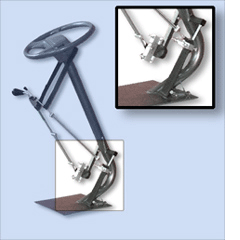
Jenaro is another YO! Volunteer from Garden Grove down in Southern California who attends Cerritos College and is the Chair for the Disability History Week Campaign.  The AT that Jenaro uses is that he has had his car equipped with hand controls so that he can drive to school, to the Dayle McIntosh Center where he works, to outreach presentations on Disability History at schools  as well as anywhere else he needs to go.


http://verballyapp.com/
The last YO! Volunteer, Damary, comes from Hayward in the Bay Area. Damary uses the iPhone and iPad application “Verbally” which helps allow Damary to communicate. Damary simply types into her device what she would like to say and it repeats it back outloud. It has helped her with her college classes as well as helping her run Disability Action Network for Youth (DANY) meetings in Hayward. She has even demonstrated the Verbally app  in a AT Network video contest to show how it works and won third place! 

We are so grateful to all of our YO! volunteers and we are grateful for AT devices - we couldn't do our important work without volunteers or AT.  Three cheers for YO! VOluntteers and three cheers for the AT devices they use to accomplish their important tasks and to be independent.

Tuesday, February 5, 2013

Helpful AT for People With Cerebral Palsy

By Alexa McBride, YO! Disabled and Proud Volunteer


Alexa McBride, YO! Disabled and Proud Volunteer
Hi! My name is Alexa McBride. I have cerebral palsy and have found a few adaptive devices that have helped me get through life easier.
  
For example, when I was in high school I started using a laptop computer. However, the way I navigated my way around my laptop is different then using a standard mouse with a computer. The "mouse" that I used was attached to my wheelchair on the sides of my headrest. It had two buttons that I could hit by tilting my head to the side.  One button would move the mouse cursor and another button would select the item that I would choose. The keyboard I had was actually on my screen of the laptop and I would use the same device located on my headrest to select the letter I wanted to type. This device quickly became easier for me to use and I became very accustomed to navigating with my head. This system works the best for me because I cannot really use my hands consistently. Unfortunately, this device was taken away from me when I graduated high school because it was on loan from the school district.


Low vision keyboard with keyguard
Now that I am in college, I decided that I had to teach myself how to use my hands and type on the computer with a keyguard.  A keyguard is designed to help people who may have trouble pressing only one key at a time.  It can be a plastic or metal frame that fits securely over the keyboard and provides physical separation between each key so that one doesn't accidentally hit the keys next to the one they are trying to hit.

Today I can use a mouse that works and looks like a regular mouse except it is a little bit larger and has a ball in the front of it that I use to move the cursor around. The large ball moves around just like the scroll wheel does on a standard mouse.  Both the keyguard and the trackball mouse make navigating the computer much easier for me.
In addition to the computer being adapted to my needs, I also own a van that has a ramp in the back of it for better wheelchair access.  All I have to do is drive up the ramp and sit in the back in my wheelchair. I am grateful for my car and the access to transportation that it gives me. Without my car I could not do -or have- the things that I do now. For example, if I didn't have my car I would not be going to Sacramento State College and pursuing my career dream of being a 7th grade math teacher. I also wouldn't be able to just hang out with my friends at the library. If I didn't have my van I would always have to plan my entire day in advance.

In conclusion,  I am very thankful for my all my assistive technology devices.  Without them, it would be very difficult to enjoy the same activities, work and study to pursue my career goals. I encourage everyone with a disability to explore the many amazing AT adaptations that can help people be independent.